If you received an error saying There is no script engine for file extension “.vbs” then you may have an incorrectly registered VBScript dll.
This is easily fixed by re-registering the VBScript DLL file, by loading the Run box (Press WINDOWS KEY + R to access this) and running the following command:
regsvr32 %systemroot%\system32\vbscript.dll
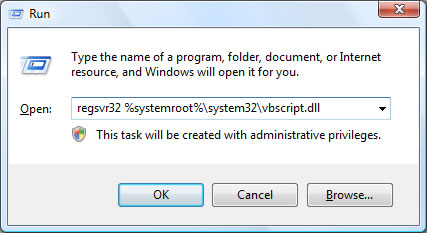
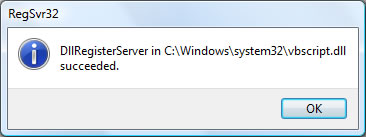
If this is completed successfully, you’ll receive the following message:
“DllRegisterServer in C:\Windows\system32\vbscript.dll succeeded.”
Lastest posts in Hacks
- 8 Ways to Access Blocked Sites - July 25th, 2011
- New Backup to Dropbox plugin backs up your WordPress site for free - May 6th, 2011
- Two questions about nofollow - July 2nd, 2010
- How To Publish a Post But Keep It "Hidden" - May 16th, 2010
- Windows Vista Tips: Disable Data Execution Prevention - September 2nd, 2009
- Windows Vista Tips: Delete Temporary Files - April 29th, 2009
- Windows Vista Tips: Best Vista AntiVirus - April 7th, 2009
- Windows Vista Tips: Disable User Access Control - April 7th, 2009
- Windows Vista Tips: Free Vista Firewall - March 30th, 2009
- Windows Vista Tips: Create a Strong Password - March 30th, 2009

{ 2 comments… read them below or add one }
How to fix the problem for “There is no script engine for file extension “.exe”
Sometimes after trojan / spyware / virus attack you try to load useful windows application like msconfig, msinfo, regedit or cmd and it tells you that annoying message.
The following solution regards a case when you ARE ABLE to load exe files but not specific application/s:
1st option:
search the registry for the name of MSConfig.exe and when you find a key named “Debbuger” with the value of somekind
just delete the value and leave it empty.
windows will no longer try to run a script engine to load the application.
2nd option:
rename the application you cant load to something else but similar for ease of remembering and run it.
3rd option:
if you can’t run regedit at all there are plenty of of reg fixes or exe fixes for that:
http://www.kellys-korner-xp.com/xp_tweaks.htm
http://www.bahramov.com/2009/04/02/windows-xp-file-association-fixes/
also works in case you can’t load any exe file or any other extension you can reg fix it by loading fixes to registry.
another place to reset your services to a good state is:
http://www.blackviper.com/WinXP/registry.htm
{ 1 trackback }