adsense Browser CSS easy learn joomla programming Fix google Hacks Javascript Joomla joomla code joomla programming MySQL PHP Programming secret speed Technology Template Tips Tricks Tutorial Video Vista Windows

3.2.4 Joomla Global Configuration

Filed Under ( Joomla, PHP, Programming, Technology, Tutorial ) by admin on 28-09-2009

Tagged Under : , , ,

eCommerce website design

Global Configuration is the page that is used to manage the variables value in configuration.php file. In the picture of 3.15 shows any kind of the variable group that can be managed in the Global Configuration.
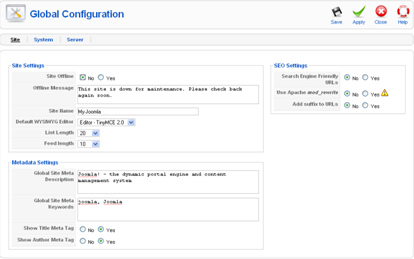
Global Configuration page

Picture 3.14 Global Configuration page
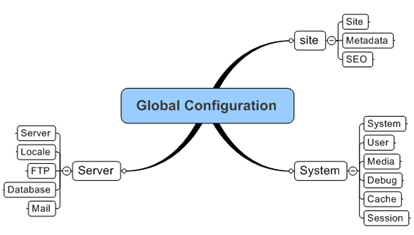
Mind map global configuration

Picture 3.15 Mind map global configuration
Read the rest of this entry »
3.2.3 Joomla Media Manager

Filed Under ( Joomla, PHP, Programming, Technology, Tutorial ) by admin on 16-09-2009

Tagged Under : , , ,

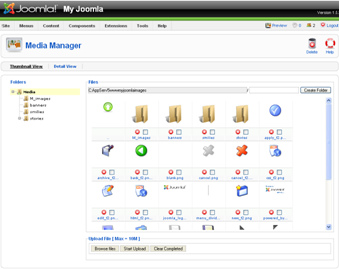
This page is used for managing the picture files either in the format of jpg, gif, and png. You can also group these files into folder which an appropriate with its name. Of course, you can only make and modify the folder. When you see the Media Manager page for the first time, you must be familiar with it. Actually, the Media Manager appearance is the same with Windows Explorer. He has two variations:
• Thumbnail View shows icon preview from those files. The example is in the picture 3.10.

• Detail View shows file datas in the list form. These data such as preview, picture name, dimension, and size file.

Media Manager page

Picture 3.10 Media Manager page
Read the rest of this entry »

3.2.2 Joomla User Management

Filed Under ( Joomla, PHP, Programming, Technology, Tutorial ) by admin on 16-09-2009

Tagged Under : , , ,

the epitome of invincibility and confidence

The visitor can register theirselves to become member in Joomla! In Joomla!, it is usually called as user. Every user has their own rule about their play a part in your Joomla! site. You can manage the access right of each user. For a while, you only have one user that is Admin. You are the Admin itself. You can do everything you want into your Joomla! site.

Picture 3.5 The user management page

Read the rest of this entry »

3.2.1 Joomla Control Panel

Filed Under ( Joomla, PHP, Programming, Technology, Tutorial ) by admin on 11-09-2009

Tagged Under : , , , , ,

Control Panel menu is the menu which will bring you back into the first page of administration area. In that page, there are icons of shortcut that is used to go to another page. It is chosen from the functions that oftens to get used.

Picture 3.4 Control panel area

3.2 Joomla Menu Site

Filed Under ( Joomla, PHP, Programming, Technology, Tutorial ) by admin on 11-09-2009

Tagged Under : , , , , ,

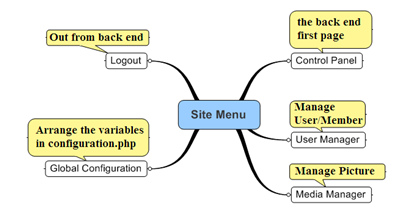
This menu controls all of the things that can affects you site entirely. You can considere this menu as the main menu for controlling the site. All of the management is summarized into the menus under the site menu. There are 5 menus inside the site menu. You can know its function as you can see in the picture 3.3.

The short explanation of site menu

Picture 3.3 The short explanation of site menu

Next is one by one explanation about those menus.

thoughts

3.1 Joomla Back End Structure

Filed Under ( Joomla, PHP, Programming, Technology, Tutorial ) by admin on 11-09-2009

Tagged Under : , , , , ,

After learning about Joomla! at a glance, in this chapter, we will try to modify Joomla! We will add and change everything that appears in the Joomla! page.

As we know that in order to modify website, we have to enter as the administrator. Generally, the back end structure page can be seen as in the picture 3.1.

Picture 3.1 The administrator page structure

The most important part in the back end structure is menu. Why? It is because we can jump from one page into another page through menu. By understanding the present structure, we can find the page that we want.

Generally, menu can be described as the following:

Picture 3.2 The structure menu in the administrator page

By using mindmap as in the picture 3.2, you can see all of the menus clearly. From those menus, Joomla! is being controlled. Each of the menu will be discussed detailly in the next sub chapter as the following.

2.2 Joomla Back End

Filed Under ( Joomla, PHP, Programming, Technology, Tutorial ) by admin on 10-09-2009

Tagged Under : , , , , ,

The web administration management (usually called as back end) in Joomla! You can enter into this administration area through the following address:
[domainname]/administrator

In this tutorial training context, you can access it through the following address:
http://localhost/myjoomla/administrator/
Read the rest of this entry »

2.1.5 Joomla Decorative Elements

Filed Under ( Joomla, PHP, Programming, Technology, Tutorial ) by admin on 10-09-2009

Tagged Under : , , ,

Space for Logo is a space or area for your site logo. It is an element or a part from the site which decoration private. This logo shows your identity plus can attract the visitor. Try to make this logo becomes one with the whole web style such as the choosing of color, picture, or font.

The Joomla! default logo
Picture 2.16 The Joomla! default logo.