

Windows Vista Tips: Take Ownership of Files
Filed Under ( Technology, Tips, Windows Secret ) by admin on 18-05-2009
Tagged Under : Folder, security, Tips, Vista, Windows
Sometimes you will need to move, delete or modify files within Windows, but you might get a permission error. This is probably for a good reason, as these files could be essential to the running of Vista, however sometimes file permissions can be set incorrectly.
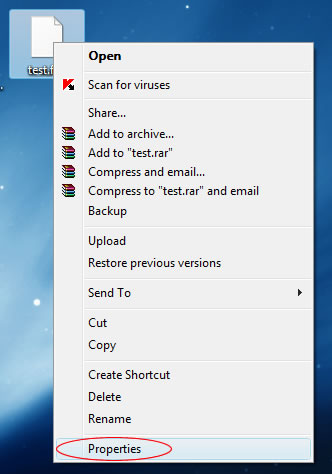
To fix this problem you’ll need to take ownership of the files by doing the following. Right click on the file you wish to take ownership of and select Properties:
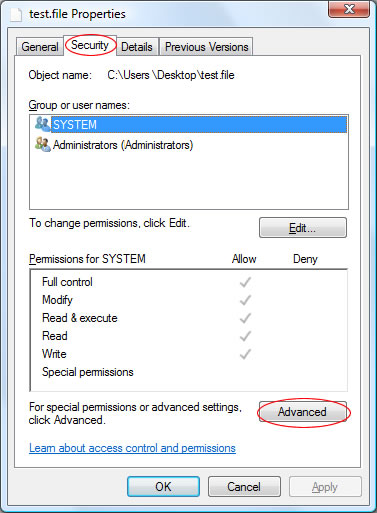
Then click the Security tab and select the Advanced button:
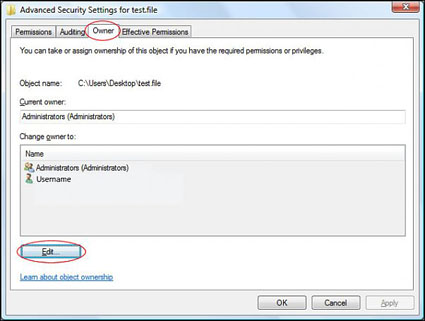
The click the Owner tab and then the Edit button:
In this window, select the new owner of the file (normally, your username). Then click OK:
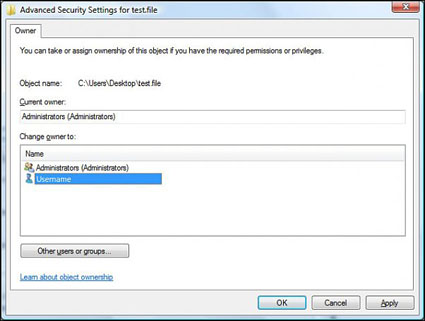
The file is now under your ownership!
Related posts:
