Windows Vista Tips: Delete Temporary Files

Filed Under ( Hacks, Technology, Tips, Tutorial, Windows Secret ) by admin on 29-04-2009

Tagged Under : , , ,

Windows Vista includes a very useful “Disk Cleanup Tool” which does exactly as the name suggests, and allows you to remove a wide variety of temporary and cached files that you no longer need. Most applications will automatically remove the temporary files once you have closed the software down, but in some cases (such as crashes or bad programming), trails can be left behind. Removing these files will create extra diskspace and keep your system in good condition.

To begin, load the Run box by pressing WINDOWS KEY + R, then type “cleanmgr” and click OK:

Now, select the drive you wish to clean up. Normally the “C:” is your primary drive where temporary files will be located. Click OK once you have done this:

Read the rest of this entry »

Windows Vista Tips: Select Multiple Files with Checkboxes

Filed Under ( Technology, Tips, Tutorial, Windows Secret ) by admin on 14-04-2009

Tagged Under : , ,

There are many occasions when you will want to select multiple files in Windows Explorer view when the normal “drag and highlight” can’t cope with the spread of files.

The usual method of selecting these multiple files is to hold down CTRL and then single click on each file you wish to select.

However, Windows Vista has introduced a much easier and more convenient method of selecting multiple files.
To enable this, load Windows Explorer by pressing WINDOWS KEY + E or going to Start Menu > Computer. Now, click on the Organise button, then Folder and Search Options:

Then click the View tab and tick Use Check Boxes to Select Items, followed by OK:

Read the rest of this entry »

Video Tutorial: Using the Firefox Web Developer toolbar Part15

Filed Under ( CSS, Firefox, Joomla, Liquid Layout, PHP, Programming, Tips, Tutorial, Video Tutorial ) by admin on 07-04-2009

Tagged Under : , , , , , ,

Video Tutorial: Finding where all the pretty went Part14

Filed Under ( CSS, Joomla, Programming, Technology, Tips, Tutorial, Video Tutorial ) by admin on 07-04-2009

Tagged Under : , , , , , ,

Windows Vista Tips: Best Vista AntiVirus

Filed Under ( Hacks, Technology, Tips, Tutorial, Windows Secret ) by admin on 07-04-2009

Tagged Under : , , ,

All of the major AntiVirus companies (such as Norton, McAffee, Kaspersky, NOD, AVG etc…) all have Vista compatible versions of their software out at the moment. At launch, some older product versions were incompatible with some elements of Windows Vista.

It is important to note that there is no “best” anti-virus for Vista, but a selection of choices which will all suit different people better. Some people will only use Free Antivirus solutions, and other won’t mind paying to protect their PC. For this reason, this article will highlight our current recommendations for different situations.

There is a great resource called AV-Comparatives that tests all of the major Antivirus packages every few months. The results change fairly often, but it is possible to spot providers with good antivirus software from this list.

Free Anti-Virus Software

The major free anti-virus packages are:

AVG Free
AntiVir
Avast

All of these choices offer reasonably good antivirus protection, but don’t offer an all round security package in the free versions. Our current pick of the bunch would be AntiVir, due to it’s performance in recent tests. It is worth reading the features of each application if you are restricted to free software, as each has its own advantages and disadvantages.

Paid Anti-Virus Software

There are a great number of paid antivirus software packages, the most popular ones being:

Norton
McAffee
Kaspersky
F-Prot
NOD32
Plus, paid versions of the “free” listings above

Our experience with both Norton and McAffee is bloated anti-virus software, both of which seemed to slow the system down. However, the recent Norton 360 package (offering all-in-one protection) has drawn some more positive comments. These packages may suit either a new computer user or a corporate environment, however computing enthusiasts and power users may want to look at other alternatives.

F-Prot and NOD32 are popular high-end anti virus solutions, with NOD32 in particular being highly recommended by computer experts.

Our own preference for an Anti-Virus package would be Kaspersky Internet Security (a stand along AV solution is also available). This provides all round security with excellent virus definitions and is reasonably priced. For a knowledgeable computer user, this package allows considerable customisation and is light on power usage.


Windows Vista Tips: Disable User Access Control

Filed Under ( Hacks, Technology, Tips, Tutorial, Windows Secret ) by admin on 07-04-2009

Tagged Under : , ,

Windows Vista introduced the User Access Control (UAC) feature to improve security for the end user, however if you are an experienced power-user it is quite likely that you find UAC extremely annoying.

Fortunately, disabling it is very straight forward (although I would not recommend doing this unless you are aware of the consequences).

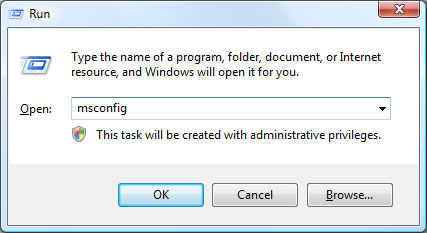
First, load the MS config utility by typing “msconfig” in the run box (Press WINDOWS KEY + R to access this) then click OK:

Run

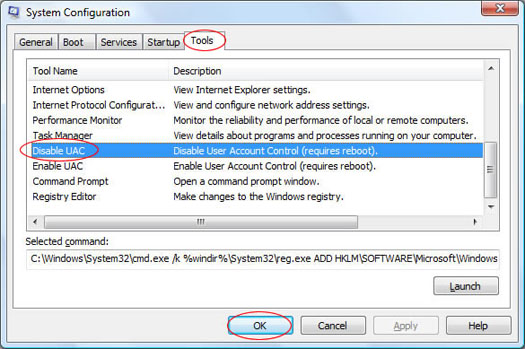
Once MSConfig is loaded, click on the Tools menu then select Disable UAC in the menu then click OK:

System Configuration

This will then run a script to disable UAC, which requires a restart to complete. If you wish to re-enable UAC, simply repeat the above steps but click Enable UAC instead.