

Windows Vista Tips: Speed Up Internet Explorer
Filed Under ( Technology, Tips, Tutorial, Windows Secret ) by admin on 10-02-2009
Tagged Under : Tips, Vista, Windows
It may be possible to speed up the browsing performance of Internet Explorer with some careful tweaking (assuming you already have a reasonably high speed connection, i.e over 512kbps).
Normally Internet Explorer makes use of a maximum of 2 connections to a server when downloading a webpage. For example, this page is made up of a single HTML file, several images and other scripts. All of them are needed to render the page, so Internet Explorer uses 2 connections to download them as quick as possible.
Two connections are used as this is a defined in the HTTP standards, however increasing this limit may speed up some pages made from many elements. This does involve modifying the registry, so should only be attempted if you are confident in doing so (and have appropriate backups).
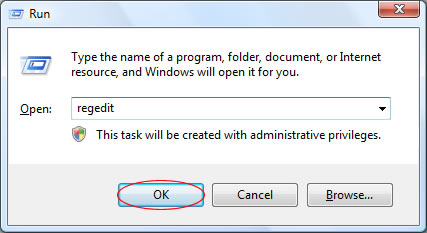
To start, load the Registry Editor by starting “regedit” from the run box (press WINDOWS KEY + R to load this):
Then browse to the following folder:
[HKEY_CURRENT_USER\Software\Microsoft\Windows\CurrentVersion\Internet Settings]
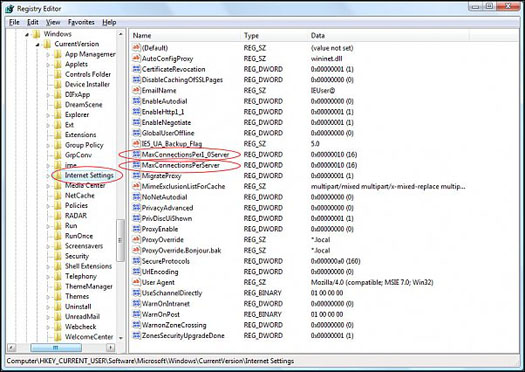
In the right panel there are two entries called MaxConnectionsPerServer and MaxConnectionsPer1_0Server that store the maximum connection values. Double clicking each of them and selecting a decimal value will create a new connection limit. 8 Connections is a sensible limit to see how the performance changes:
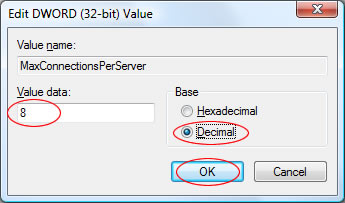
Once you have restarted your computer, the new connection limit will be in place. To revert the changes, simply change the connection limit back to 2.
Related posts:
