

Vista Speed Secret #11: Shut-Off Windows Hibernation
Filed Under ( Hacks, Technology, Tips, Tutorial, Windows Secret ) by admin on 06-02-2009
Tagged Under : Vista, Windows Secret
Windows hibernation background services use a very large amount of system resources. If you are like most people you don’t use the Hibernate feature very much so you may want to disable it to give Vista a performance boost.
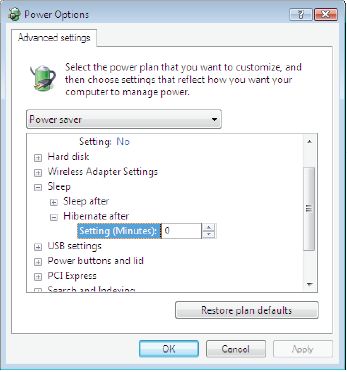
To shut down Hibernation:
- Click the Start button
- Select Control Panel
- Click the Classic View on the left hand side
- Double-click on Power Options
- Select Change Plan Settings
- Choose Change Advanced Power Settings
- Click the Sleep “plus” icon
- Click the Hibernate After “plus” icon
- Adjust your selector down to zero minutes
- Click Apply
- Click OK
Related posts:
