

Vista Speed Secret #2: Disable Unnecessary Graphical Effects

Filed Under ( Hacks, Technology, Tips, Tutorial, Windows Secret ) by admin on 21-01-2009

Tagged Under : , ,

http://www.technologystory.net/wp-content/plugins/sociofluid/images/digg_48.png http://www.technologystory.net/wp-content/plugins/sociofluid/images/reddit_48.png http://www.technologystory.net/wp-content/plugins/sociofluid/images/blinklist_48.png http://www.technologystory.net/wp-content/plugins/sociofluid/images/newsvine_48.png http://www.technologystory.net/wp-content/plugins/sociofluid/images/technorati_48.png http://www.technologystory.net/wp-content/plugins/sociofluid/images/magnolia_48.png http://www.technologystory.net/wp-content/plugins/sociofluid/images/google_48.png http://www.technologystory.net/wp-content/plugins/sociofluid/images/myspace_48.png http://www.technologystory.net/wp-content/plugins/sociofluid/images/facebook_48.png http://www.technologystory.net/wp-content/plugins/sociofluid/images/yahoobuzz_48.png http://www.technologystory.net/wp-content/plugins/sociofluid/images/sphinn_48.png

Vista is “sexy” because of its new aero glass transparency effects. Here is how to enable and disable this new eye candy.

  1. Click Start (Windows) button
  2. Select the Control Panel
  3. Double-click Click Appearance and Personalization
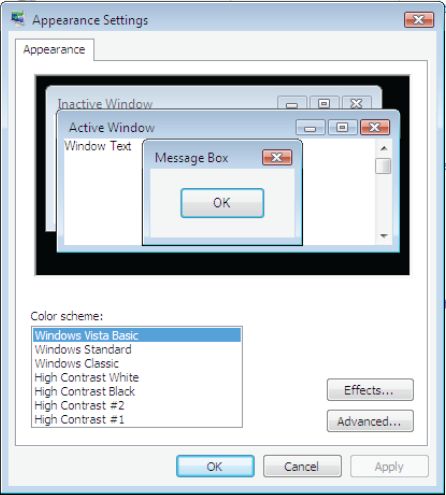
  4. Under Personalization, click Change the color scheme
  5. In the Appearance Settings dialog box, click Windows Vista
    Basic
    , and then click OK.

Or, if you prefer a Windows 2000-style interface, click Windows Standard, and then click OK.
Related posts:

  1. Vista Speed Secret #7: Disable Automatic Windows Defender Operation
  2. Vista Speed Secret #9: Disable Unused Services
  3. Vista Speed Secret #1: Turn-Off User Account Control (UAC)
  4. XP Speed Secret #7: Disable File Indexing
  5. Vista Speed Secret #4: Disable Automatic Disk Defragment

Post a comment

Facebook fan page of Technology Story Technology Story on twitter
HI