

XP Speed Secret #3: Speed-Up File Browsing
Filed Under ( Hacks, Technology, Tips, Tutorial, Windows Secret ) by admin on 04-11-2008
Tagged Under : secret, Tips, Windows
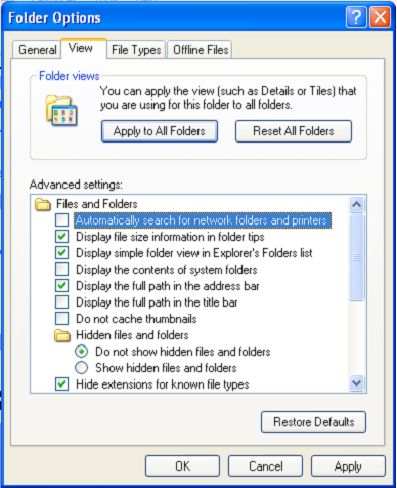
You may have noticed that every time you open “My Computer” to browse folders that there is a slight delay. This is because Windows XP automatically searches for network files and printers every time you open Windows Explorer. To fix this and to increase browsing speed significantly:
- Double-click on My Computer
- Click the Tools menu
- Select Folder Options
- Click on the View tab.
- Uncheck the Automatically search for network folders and printers check box
- Click Apply
- Click OK
- Reboot your computer
Related posts:
