

XP Speed Secret #2: Optimize Display Settings
Filed Under ( Hacks, Technology, Tips, Tutorial ) by admin on 23-10-2008
Tagged Under : Windows
1. Click the Start button
2. Select Control Panel
3. Double-click the System icon
4. Click the Advanced tab
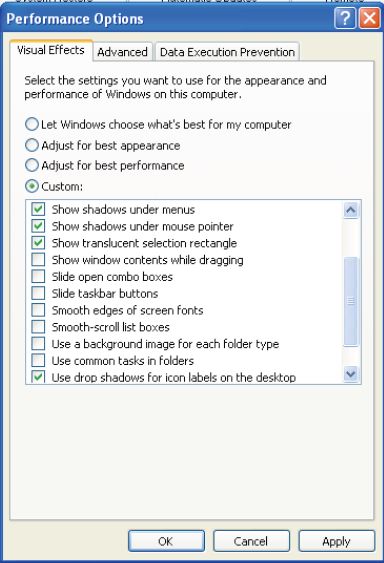
5. In the Performance box click Settings
6. Leave only the following ticked:
- a. Show shadows under menus
- b. Show shadows under mouse pointer
- c. Show translucent selection rectangle
- d. Use drop shadows for icons labels on the desktop
- e. Use visual styles on windows and buttons
7. Finally, click Apply and OK
Related posts:
