

Make your own Joomla Template: Part 6 (Using jdoc)
Filed Under ( Joomla, PHP, Photoshop, Programming, Technology, Tips, Tutorial ) by admin on 07-09-2008
Tagged Under : Joomla, PHP, Programming, Tutorial
Joomla Template Tutorial - Part 6: In Joomla Template, the important thing is jdoc tag. As you see at below picture, jdoc tag is a way load module, component, and head component (like title, description, keywords, etc). In this post, we will try to use jdoc tag.
I just rememberring picture that placed jdoc in blocks.
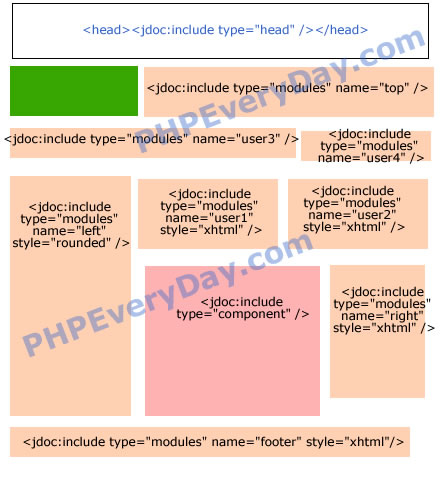
From the picture, you can guess the jdoc formula:
<jdoc:include type="[head|module|component]" />
So, open your index.php within mytemplate folder. Add following bold code:
< ?
// no direct access
defined( '_JEXEC' ) or die( 'Restricted access' );
? >
< html >
< head >
<jdoc:include type="head" />
< / head >

<body>

<table width="100%" border="1" bgcolor="#FFFF00">
    <tr>
      	<td
colspan="3">
<jdoc:include type="modules" name="top" /></td>
    </tr>
    <tr>
      	<td colspan="2">jdoc:include type="modules"
name="user3" /></td>
      	<td>jdoc:include
type="modules" name="user4" /></td>
    </tr>
    <tr>
      	<td rowspan="2"
valign="top">jdoc:include
type="modules" name="left" /></td>
      	<td colspan="2">
        	<table width="100%" border="1">
            	<tr>
                	<td>jdoc:include type="modules"
name="user1" /></td>
                	<td>jdoc:include type="modules"
name="user2" /></td>
                </tr>
            </table>
        </td>
    </tr>
    <tr>
      	<td height="200">jdoc:include
type="component" /></td>
      	<td valign="top">jdoc:include type="modules"
name="right" /></td>
    </tr>
    <tr>
      	<td colspan="3">jdoc:include type="modules"
name="footer" /></td>
    </tr>
</table>

< / body >
< / html >
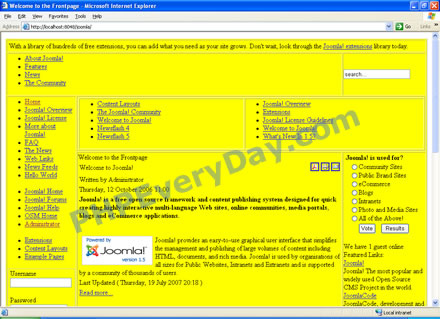
The result, like this:
Related posts:

Hi…. I just want to say that this article had been very helpful to me.. Thank you very much…. hope that you’ll post more….
This is the best of all the joomla article i’ve read..